Appearance
Fresh
Single sign-on
Back
Single sign-on overview
Copy as Markdown
Open MarkdownAsk Docs AIClaudeOpen in Claude
Table of contents
Subscription:Business
Requires:Docker Desktop 4.42 and later
For:Administrators
Single sign-on (SSO) lets users access Docker by authenticating through their identity providers (IdPs). SSO can be configured for an entire company, including all associated organizations, or for a single organization that has a Docker Business subscription.
How SSO works
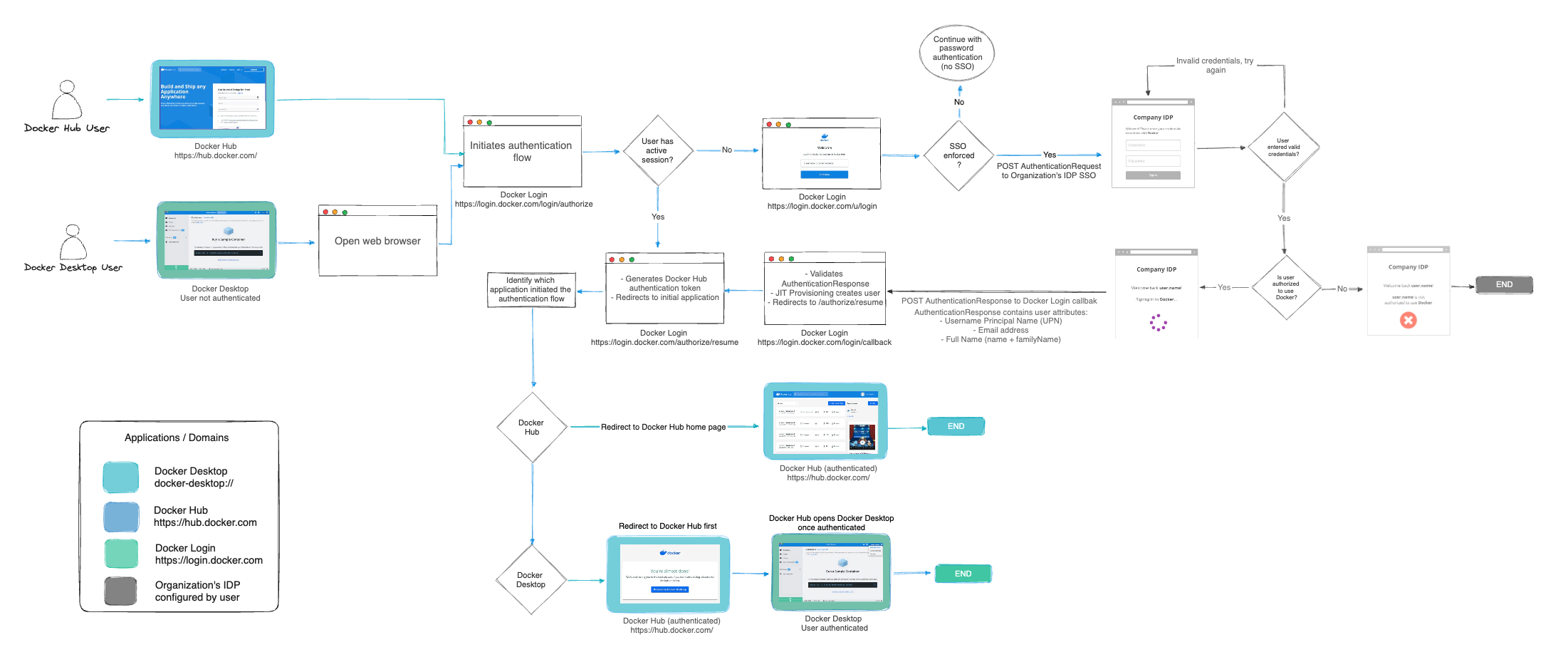
When SSO is enabled, Docker supports a non-IdP-initiated flow for user sign-in. Instead of signing in with a Docker username and password, users are redirected to your IdP’s sign-in page. Users must initiate the SSO authentication process by signing in to Docker Hub or Docker Desktop.
The following diagram illustrates how SSO operates and is managed between Docker Hub, Docker Desktop, and your IdP.
Set up SSO
To configure SSO in Docker, follow these steps:
- Configure your domain by creating and verifying it.
- Create your SSO connection in Docker and your IdP.
- Link Docker to your identity provider.
- Test your SSO connection.
- Provision users in Docker.
- Optional. Enforce sign-in.
- Manage your SSO configuration.
Once configuration is complete, users can sign in to Docker services using their company email address. After signing in, users are added to your company, assigned to an organization, and added to a team.
Important
Docker plans to deprecate CLI password-based sign-in in future releases. Using a PAT ensures continued CLI access. For more information, see the security announcement.
Next steps
- Start configuring SSO.
- Read the FAQs.
- Troubleshoot SSO issues.